How To Locate Lost Jio Phone – Track & Find Jio Device
It is common that missing our phones in our busy schedule days. May be stolen or missing somewhere. Even we have extra care on our mobile phones, sometimes that may happen. Here in this post, we are going to share how to locate lost Jio phone by yourself. If you have smartphone inserted Jio SIM and it lost, our this guide will help you to track and locate your device easily. Jio provides full security on your device and the data the device contains.
Locate Lost Jio Phone Or Smartphone Having Jio SIM inserted
If you are using In-Built Jio SIM inserted Jio Phone or you have any other smartphones having Jio SIM inserted, it is simple to track and locate the lost or stolen smartphone.
Jio introduces couple of apps in their app library. There two apps Jio Security and MyJio app helps you to track and locate your lost phone.
Locate Your Jio Phone Using JioSecurity App
In this method, we are going to learn how to locate your Jio phone using the Jio security app. Jio Security app is basically for securing your smartphone from Virus attack. This is anti-virus app that makes your smartphone and the data very secure and safe.
Important: You Must download and install JioSecurity app On your smartphone. It is worth app, and you will realize the importance once you lost your phone.
Now Follow The steps:
First Go to the URL below and you will get norton sign In page, where partner users can be able to sign In. Jio is partner with Norton. Go to the Url Below. You will get a sign in page. You can sign in with any other mobile phone, personal computers or Tablet PC.
https://my.norton.com/home/partner
And using your Jio ID/Jio Number and password , sign in to the site.
You will get redirected to the Norton site panel where you can protect your device. For Jio users, they gives 10 Licenses.
When You signed In, you will have your device name on the left hand side of the page.
There you can do various things in the left panel or tab of the page.
From there, chose lock your device option. while you lock , the third party cannot be able to open your mobile phone.
Below the Lock your device option, you can see locate device. when you chose the option, a google map will appear and will spot your device in the location where it is. You can track your device then.
you can do much more management of your smartphone like
- Lock Device
- Scream
- Wipe
- Locate
etc from there
You can change the passcode/password of your mobile phone by sending messages in the format given below.

To Lock Your Device
You can Lock your device by sending an SMS to your phone in the format Below
lock<space>3187
where the 4 digit number is your device lock code/passcode
Scream Your Device
scream<space>3187
To Locate Your Device
Locate<space>3187
A message will get to your missing mobile and you will get reply message by showing the location of your missing mobile to the mobile number you have send.
To Wipe Your Device
wipe<space>3187
Note: This features cannot be undone once you send this messages.
Locate your Device using MyJio App
This is alternate method to locate your device using MyJio app. It is very easy to locate the Lost Jio phone using MyJio app.
For this, login to MyJio App from other device with the Jio Id and password of the linked device. If you have linked with MyJio app on your lost phone, then login with that Id and password on other device.
After that go to the main menu of the app, Just by tap on the top left 3 lines of the app page.

And when you go to the main menu, you can see “Settings” Tap On the settings

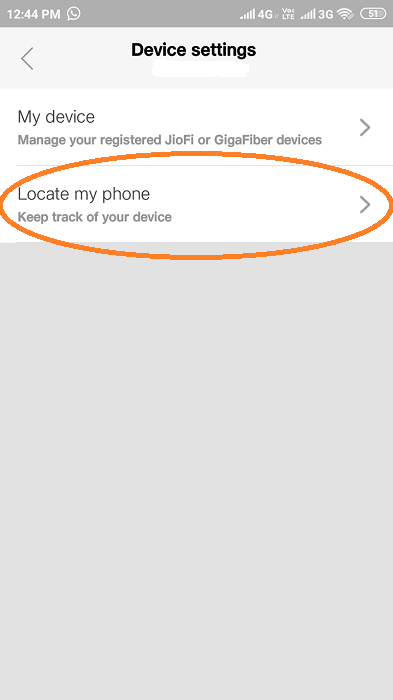
When you go to the settings, there are different options like account settings, service settings, JioPay settings, Device settings, app settings etc. From there Tap On “Device settings”

When go to the device settings, you can see two options My device and locate my device. Just chose “Locate My Device”
In the next page, you will get list of all the devices that are linked to that my jio account. Here in the screenshot, linked only one device. Just tap the device name.

Now, you will get the device location on google map page with the current address on bottom side of the page. Look the image below.

There is locate now Button.
Tip: if you are linked Jio Security app, you can track the last 10 locations the device moved On.
Additional Info
Note: The above mentioned method is based on the latest version of the MyJio app tracking method. In old version of my jio app, you can see “Locate My Device” tab on the main menu of the MyJio app. Just tap and use the rest of the method to track and locate your Jio device or Jio sim inserted Mobile phone.
Final Words:
Losing the mobile phones are very common. Now a days, no other service providers give as much facility and apps that are helping the users to track and find the device they have lost. Jio provides full supports on finding and locating the device that have Jio SIM inserted. With the top two app from Jio, MyJio and JioSecurity, your device have complete protection on both device and data basis. Both the apps are worth for Jio users. This is very informational and will helps those users lost their device.
Here to wind up th post here. We hope this article is worth for you. If you found this is helpful, please share the post on your social media. Let’s share the knowledge to your friends and families too.
Comments
Post a Comment